Blog - Channel Partner

Business Central SaaS empowers organizations to tailor their ERP systems without the traditional headaches of complexity. By leveraging extensions and low-code tools, companies can achieve deep customization while maintaining agility, scalability, and simplicity. This approach is especially valuable for SMBs that need flexibility without heavy IT overhead.
Let’s dive straight into it… The Customization Dilemma
Enterprise Resource Planning (ERP) systems have historically been seen as rigid, requiring costly and complex customizations. For small and medium-sized businesses (SMBs), this often meant either settling for limited functionality or investing heavily in bespoke development. Microsoft Dynamics 365 Business Central SaaS changes this narrative by offering extensibility through extensions and low-code tools that balance customization with simplicity.
Extensions: Modular Customization
Extensions in Business Central are modular add-ons that allow businesses to enhance functionality without altering the core system.
AL Language & Object Model: Developers can extend tables, pages, reports, and workflows using AL, Microsoft’s programming language for Business Central.
AppSource Marketplace: Thousands of pre-built extensions are available, covering industries from manufacturing to retail.
Non-disruptive Updates: Extensions run independently of the base application, ensuring smooth upgrades and reducing maintenance costs.
Examples: Adding custom pricing rules, integrating with third-party logistics providers, or automating compliance reporting.
Key Benefit: Extensions allow businesses to tailor ERP processes while preserving system stability and upgradeability.
Low-Code: Democratizing Development
Low-code platforms like Power Apps and Power Automate integrate seamlessly with Business Central, enabling non-developers to create solutions.
Citizen Development: Business users can design workflows, dashboards, and apps without deep coding knowledge.
Rapid Prototyping: Ideas can be tested quickly, reducing time-to-value.
Integration with Microsoft Ecosystem: Power BI for analytics, Teams for collaboration, and Dataverse for unified data management.
Examples: Automating invoice approvals, building mobile apps for field sales, or creating custom reporting dashboards.
Key Benefit: Low-code empowers employees across departments to innovate, reducing reliance on IT teams.
Customization Without Complexity: This Is Why It Matters
Scalability: As businesses grow, extensions and low-code apps scale with them.
Cost Efficiency: Reduces the need for expensive bespoke development.
Agility: Enables rapid adaptation to changing market conditions.
Compliance & Security: Microsoft ensures extensions and low-code apps adhere to enterprise-grade standards.
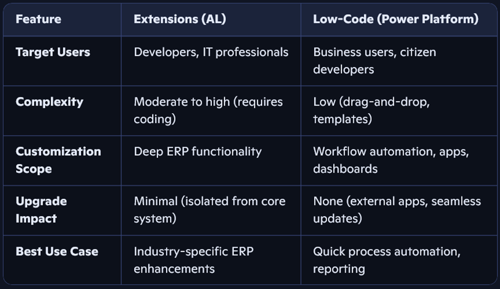
Comparison: Extensions vs. Low-Code
Risks and Considerations
Over-customization: Too many extensions can complicate governance.
Skill Gaps: AL development requires specialized knowledge.
Shadow IT: Low-code apps built without oversight may create data silos.
Mitigation: Establish clear governance policies, use Microsoft’s AppSource for vetted solutions, and align IT with business users.
Let’s Conclude…
Business Central SaaS strikes the perfect balance between flexibility and simplicity. Extensions provide deep, developer-driven customization, while low-code tools democratize innovation across the organization. Together, they enable SMBs to adapt quickly, scale efficiently, and innovate without the burden of complexity.
This dual approach—Customization Without Complexity—is what makes Business Central SaaS a powerful ERP solution for modern businesses. It empowers organizations to focus on growth and agility rather than technical hurdles, ensuring they remain competitive in a rapidly evolving digital landscape.
For organizations looking to customize without complexity—and for those seeking a solution that supports growth, agility, and insight— please do not hesitate to reach out to our SureStep Ambassador team at channel@4sight.cloud.